Where do you want to fly?
Describe your trip in your own words. I'll find the best flights.
A note to the fare-checkers
Your AI flight booking assistant. You just fly.
BookWithAI is an AI flight booking assistant. You describe a trip in one sentence; it finds and ranks real flights, explains why each ranks where it does, then lets you save a fare to track and see how its price moves, not just a one-time snapshot. It never takes your payment; you finish the purchase with the airline or another seller.
No card required. Try it free as a guest; after a few messages it asks you to sign in (also free), and guests have a daily limit.
My next trip
What if I flew to Tokyo in November…
Saved. Check back later and I'll show you how its price has moved.
Plan by chatting
One sentence in. A ranked answer out.
No dropdowns, no date grid. This is the whole interaction, and every card says why it ranks where it does.
- ① you say it once
- ② it asks instead of assuming
- ③ the reasoning is on the card
SFO to Denver, first week of November, under $200 if you can. Aisle seat person.
Two good windows that week. Departing Tue Nov 3 is the cheaper one. Top option:
Within budget · Lowest price in this result set · Non-stop journey
- ✗No checked bag included
- ?Refund rules: check with airline
When the data source doesn't say, the card tells you to check with the airline.
Saved fares
A price is only meaningful next to its own history
Search engines show you one snapshot. Save a fare in BookWithAI and its price is refreshed periodically when you visit your Price Alerts page (or on demand), alongside a short AI summary of how it has moved.
Saved fare · SFO → DEN
Price refreshed periodically or on demand. Summary: how it has moved since you saved it.
CHECK BACKToday, saved fares are refreshed periodically when you visit your Price Alerts page (only prices more than about eight hours old, a couple per visit, shown on your next visit), and you can refresh one anytime with Refresh price. The AI writes a short summary of that fare's own price history. BookWithAI does not yet re-check fares on a schedule while you are away or send notifications, so check your saved fares when you are planning to book.
More than a flight search
Plan the whole trip in one place
Searching is where it starts. Once you have a flight, the app helps you keep the rest of the trip together too.
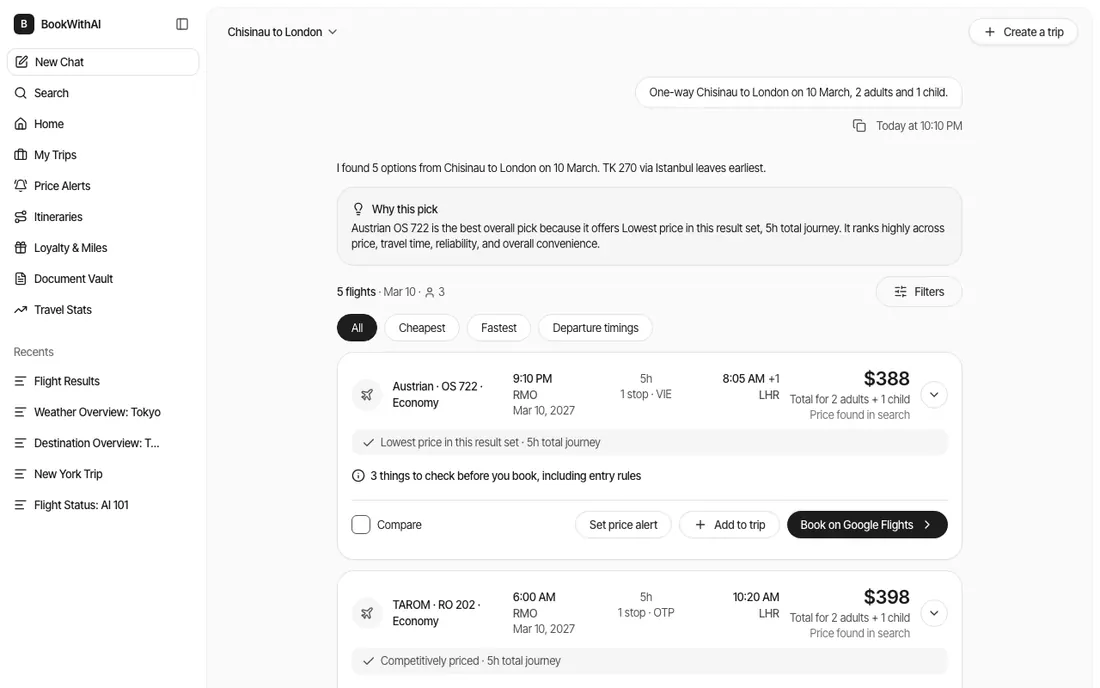
Ranked flights in the chat, with the reason for the top pick and an Add to trip button on each card. 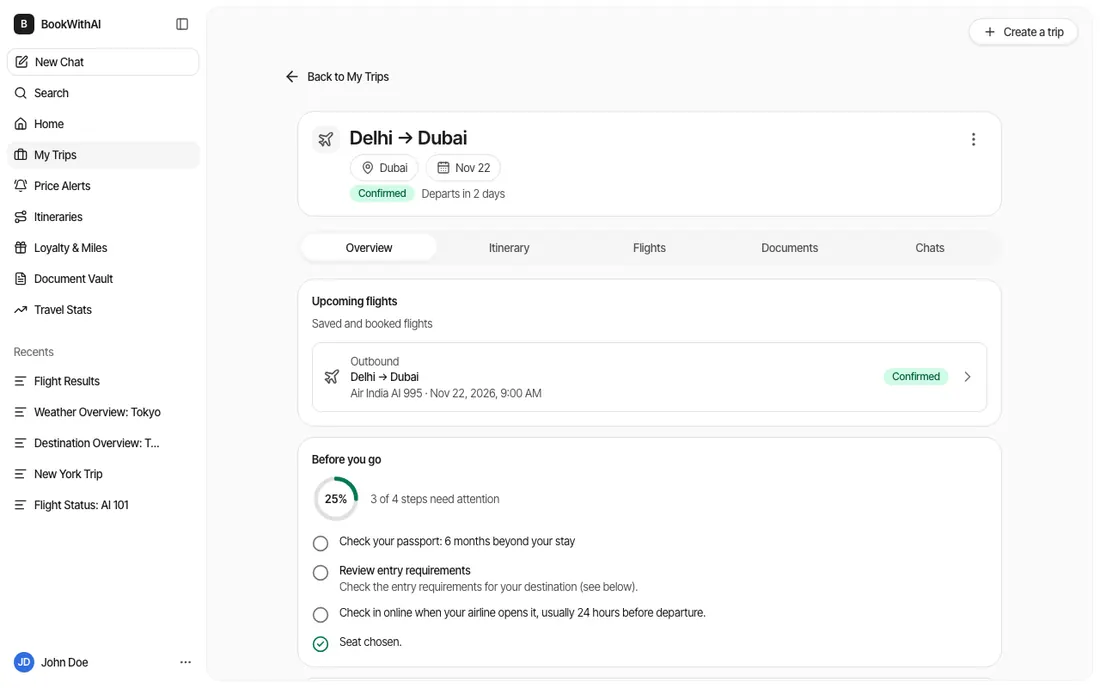
A trip page with its Before you go checklist: passport, entry rules, check-in and seat. 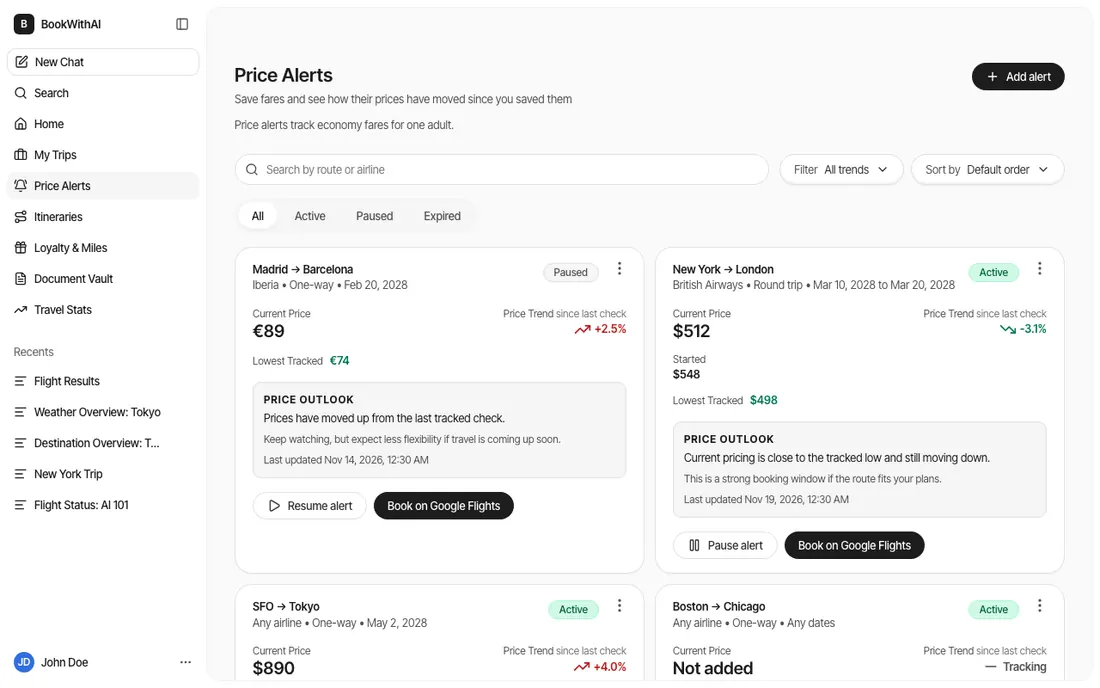
Price Alerts: your saved fares and how each price has moved since you saved it. 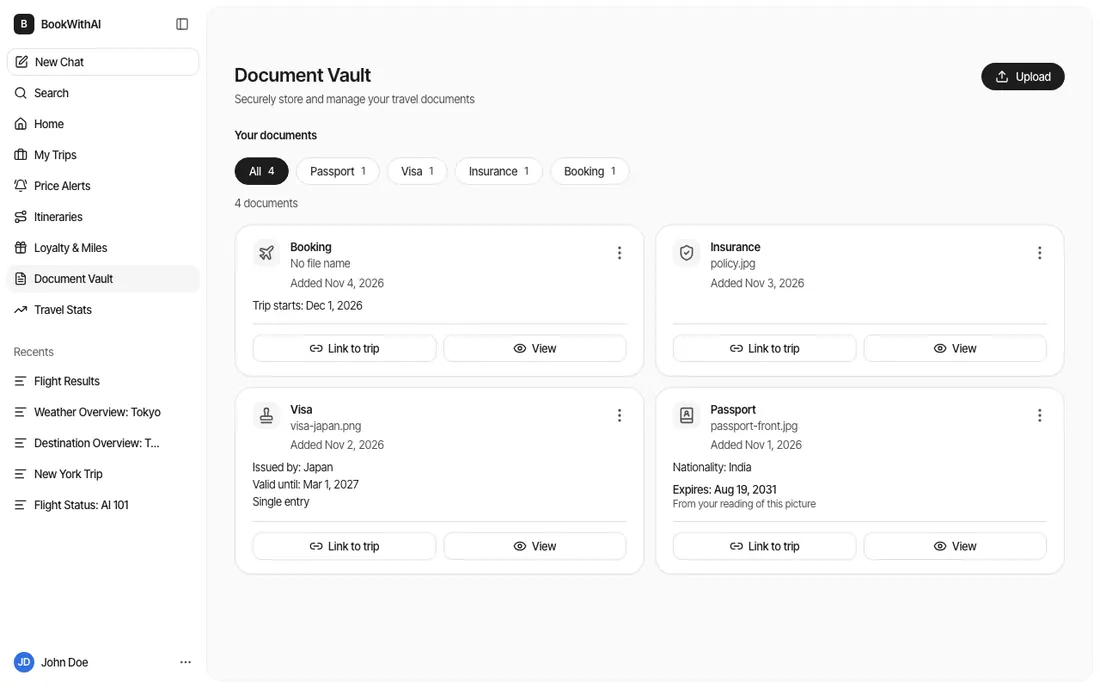
The Document Vault: copies of your passport, visa, insurance and bookings in one place.
The pictures show the app with sample data.
Trips
Press Add to trip on a flight card to save it to My Trips, or create a trip yourself. A saved trip is not a booking: book with the seller, then mark it booked. One trip can hold more than one flight, such as a return or a next city.
Day by day itineraries
Ask the assistant for a day by day plan. It shows you a draft first and saves it only when you confirm. Saved plans appear in My Itineraries, and you can copy one into a trip's day plan, then add, edit and reorder the items yourself.
Maps
Open a map of a trip's route between its airports, a map of the flights in a chat reply, and a day map with numbered pins for the places in your itinerary. Route maps need both airports saved with their codes.
Entry rules and passport checks
Every trip has a Before you go checklist that reminds you to check your passport and the entry rules for your destination, and shows the guidance with its source. When you ask about a visa, the assistant names the electronic travel authorisation (for example the US ESTA, Canada's eTA or the UK ETA), the official page to apply on, and warns about look-alike sites. It is guidance, not a promise of entry: confirm with the official page and your airline.
Document Vault
Keep copies of your passport, visas, insurance and booking confirmations. Add a photo or a PDF of up to 5 MB and 3 pages (a PDF is turned into pictures of its pages and the PDF itself is not kept). Files are stored encrypted, and you can delete them in the app.
Loyalty & Miles
Keep your airline programmes, tier and miles in one place. You type them in, and BookWithAI does not check them with the airline. The assistant reads them only if you allow it.
Price Alerts
Save a fare and open Price Alerts to see how its price has moved since you saved it. Prices follow the departure country's currency, so a flight from Delhi is shown in rupees. Price alerts track economy fares for one adult.
From the record, not the vibe
It reasons from the US DOT's own on-time records
Per-route facts, each with its coverage window. These are the tables the ranking actually reads, not marketing numbers.
- ORD → SFO
Weather accounts for 4% of the attributed delay minutes on this route.
data window: Jul 2026 – Jul 2026 - ATL → DFW
Delta leads on-time performance among carriers above the route's volume floor (64% on time across 231 flights; on time means arriving less than 15 minutes late, see the methodology).
data window: Jul 2026 – Jul 2026
Source: US DOT Bureau of Transportation Statistics, on-time performance records.
Method note: weather share is measured in attributed delay minutes, not in flights. It is the same rule the product holds itself to.
It remembers, and shows its work
Inferred from your choices. Disclosed. Erasable.
It notices some of what you actually do, tells you what it noticed, and lets you rub any of it out. You can also set preferences yourself.
- the airline you keep choosingfrom how you use the app
- you usually rank flights by pricefrom how you use the app
- morning departures, most tripsfrom how you use the app
Try the eraser. In the app, this really deletes the preference.
Why it's different
Search engines find flights. This one works for you.
- A search engine
You re-run the same search five times a week
BookWithAISave a fare and check back on how its price has moved
- A search engine
Sorted by price, with no explanation
BookWithAIEvery option carries why it ranks where it does
- A search engine
Bag fees and change rules are easy to miss until checkout
BookWithAIWhether a checked bag is included, and refund rules when the data source has them, otherwise a check-with-airline note
- A search engine
Forgets you between visits
BookWithAILearns the preferences you keep repeating, and lets you clear them
What it doesn't do
Worth stating plainly, because a marketing page is exactly where these usually get left out.
- NO PAYMENT TAKEN
It doesn't take your payment
BookWithAI never charges you for a flight. The purchase happens with the airline or travel provider, on their checkout.
- NO AUTO-BOOKING
It doesn't book on your behalf
There is no autonomous purchasing. The final booking is always a decision you make and an action you take.
- NO BACKGROUND ALERTS
No background re-checks or notifications yet
Saved prices refresh when you visit your Price Alerts page or ask for it. BookWithAI does not watch fares while you are away or send email, SMS or push alerts.
- US-STRONGEST
Coverage is uneven by design
It is strongest on US domestic routes, where the underlying public performance data is richest. International routes can be searched, but on-time data is limited outside the US.
FAQ
Fair questions
It searches real flights and ranks them with the reasoning on each card. If you save a fare, its price is refreshed periodically when you visit your Price Alerts page (or on demand), so you can see how it has moved rather than a single snapshot.
Yes. Try it free as a guest; after a few messages it asks you to sign in (also free), and guests have a daily limit. You need an account to save a trip or track a price.
Not to start. Try it free as a guest; after a few messages it asks you to sign in (also free), and guests have a daily limit. An account is also needed to save a trip or track a price, because both have to be stored against someone.
No. BookWithAI finds and ranks flights; the Book button opens a confirmation, then Google Flights, where you pick a seller (an airline or an agency) and pay them directly. BookWithAI never takes payment.
BookWithAI never asks for card details, and before you leave it shows a notice that the next page is not a BookWithAI page and who you pay. It stores your chats, account details, trip details (including confirmation and ticket numbers you enter), documents you upload and your location if you allow it, and sends your messages to its AI provider, OpenAI; and no security certification is claimed (full list: https://bookwithai.org/privacy/).
No. BookWithAI at bookwithai.org is an AI flight booking assistant; bookwithai.app is a different, unrelated salon-booking product that shares the name.
Those show you what a route costs at the moment you search. BookWithAI ranks options with the reasoning on each card, and lets you save a fare and check back on how its price has moved.
Explore
Read more before you sign up
How it works
Walk through each stage, from describing the trip to choosing a seller, including what BookWithAI deliberately doesn't do.
Guides
Practical guides on when to book, what fare brands include, and how to judge on-time performance, each explicit about what is not knowable.
AI travel planner
Most planners assume you already know where and when. A lot of real trips start the other way round.
Cheap flights
A price on its own is just a number. Here is the context BookWithAI can honestly add to it, and the context it cannot.
Travel chatbot
The chat is the easy part. What separates a useful travel assistant from a novelty is what you can do after you stop typing.
Why we never book for you
"Assistant" often means something that acts for you. This one does the planning and the reasoning, and stops short of spending your money.
Compare
Three different kinds of product get lumped together as "flight booking". They behave differently, and the honest comparison is between categories, not a list of things the others supposedly can't do.
Stop re-running the same search. Save the fare.
Free to try as a guest; after a few messages it asks you to sign in (also free), and guests have a daily limit. Sign in to save a trip or track a fare.